Imagine your newsroom needs to push a breaking story to 50,000 people instantly, without fighting a social media algorithm or waiting for someone to open an email. In the modern media landscape, a dedicated messaging channel is the only way to guarantee your audience actually sees your headlines. But you don't need a team of software engineers to make this happen. BotFather is Telegram's official bot manager that allows anyone to create and configure custom bots without writing a single line of code. It acts as the single point of entry for every bot on the platform, turning the complex process of API registration into a simple chat conversation. This tool lets journalists and editors build custom delivery systems that function as automated news desks, alert systems, or interactive audience hubs.
The Fast Track to Your First Bot
Setting up a bot isn't a technical project; it's more like filling out a form in a chat window. To get started, search for @BotFather in your Telegram app. Look for the one with the official verification checkmark to ensure you're talking to the real system. Once you hit "Start," the interface is entirely command-driven, which keeps things fast and predictable.
The most critical step is using the /newbot command. BotFather will walk you through two specific requirements:
- Display Name: This is the public-facing name. You can be as descriptive as you like, such as "City Gazette Breaking News" or "Daily Tech Alerts."
- Username: This is the unique handle (e.g., @citygazette_bot). It must be unique across all of Telegram and must end with the word "bot."
Once you finish these steps, BotFather gives you an HTTP API token. Think of this token as the master key to your bot's brain. If you lose it or it gets leaked, anyone can control your news feed, so keep it secure. This token is what you'll plug into automation tools to make the bot actually "do" things.
Turning a Bot into a News Distribution Hub
A bot that just exists is useless; a bot that distributes content is a powerhouse. For newsrooms, the primary goal is usually moving a story from a Content Management System (CMS) to a user's phone. While BotFather creates the bot, the actual delivery often relies on Zapier or n8n, which are automation platforms that connect different apps.
By using the token provided by BotFather, you can create a workflow where a new article published on your website automatically triggers a message to your Telegram channel. This removes the manual effort of copying and pasting links, ensuring your breaking news is live in seconds. For those scaling their operations, n8n allows you to save the bot token as a reusable credential, meaning you can manage a fleet of bots for different news beats-politics, sports, local weather-all from one dashboard.
| Feature | Newsroom Use Case | BotFather Command/Setting |
|---|---|---|
| Bot Description | Telling users what news they will receive | /setdescription |
| About Section | Linking to the main website or terms of service | /setabouttext |
| Menu Button | Quick links to "Latest News" or "Contact Tips" | /setcommands |
| Privacy Mode | Controlling how the bot reads messages in group chats | /setprivacy |

Solving the 'Chat ID' Puzzle
One common point of frustration for journalists is that BotFather doesn't give you the "Chat ID." The API token identifies the bot, but the Chat ID identifies the destination (the specific user or channel). You can't send a message to a void; you need a target.
To find this, have your bot join the channel or have a user send the bot a message. Then, use the
Telegram API by visiting a specific URL in your browser: https://api.telegram.org/bot[YOUR_BOT_TOKEN]/getUpdates. Replace the bracketed text with your actual token. The resulting page will show a block of JSON code containing a numerical ID. That number is your destination address. Without it, your automation tools won't know where to push the news.
Advanced Customization for Global Audiences
If your newsroom operates in multiple languages, BotFather allows you to create separate bot instances or configure multilingual responses. This is vital for news organizations serving diverse immigrant populations or international readers. You can set up one bot for English speakers and another for Spanish speakers, ensuring the tone and content are culturally relevant.
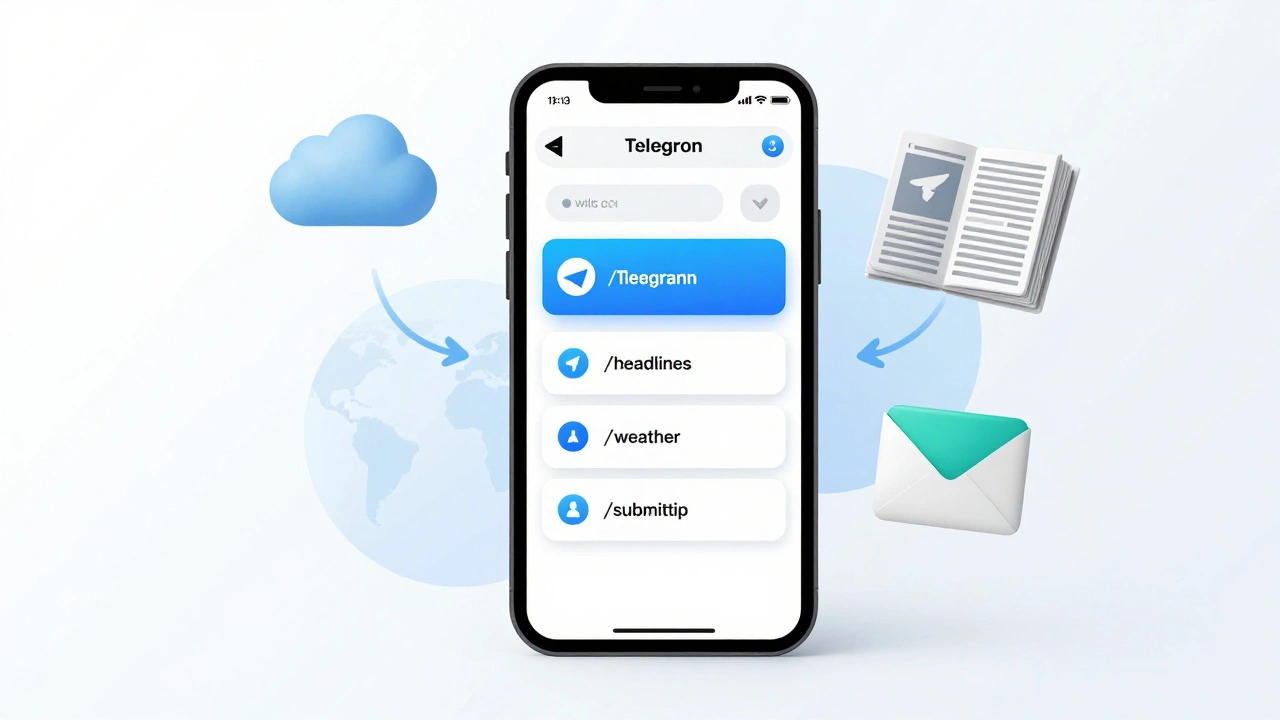
Beyond just blasting news, you can use the /setcommands feature to create a structured menu. Instead of users guessing what to type, they see a list of options like /weather, /headlines, or /submittip. This turns a simple notification tool into an interactive service, increasing audience engagement and giving you a direct line for crowdsourcing stories.
Pitfalls to Avoid When Automating
The biggest mistake newsrooms make is treating a bot like a spam machine. Telegram users are protective of their notification trays. If you push ten minor updates a day, they will block your bot. Use BotFather to carefully manage your bot's profile and set clear expectations in the "Description" field about how often you'll post.
Another risk is security. Since the bot token is the only thing protecting your bot, avoid sharing it in public Slack channels or documenting it in shared Google Docs. If a token is compromised, use the /revoke command in BotFather immediately to kill the old token and generate a new one. This is the equivalent of changing your password after a hack.
Does it cost money to create a bot with BotFather?
No, BotFather is a free service provided by Telegram. There are no subscription fees for creating or managing your bots, regardless of whether you are an individual journalist or a large media corporation.
Can I change my bot's username later?
You can change the display name, but the username (the one ending in "bot") is permanent once set. If you need a completely different username, you will have to create a new bot using the /newbot command.
What is the difference between a Bot and a Channel?
A channel is a one-way broadcast tool for sending messages to many subscribers. A bot is a programmatic tool that can interact with users, process commands, and integrate with external data. Most newsrooms use both: a bot to automate the posting of content into a channel.
Do I need to know how to code to use BotFather?
Not at all. BotFather is designed for non-developers. You manage everything through a chat interface using simple commands. You only need technical tools (like Zapier or n8n) when you want to automate the bot's responses or content delivery.
How do I stop my bot from reading all messages in a group?
You can adjust the Privacy Mode using the /setprivacy command. When enabled, the bot will only receive messages that start with a slash (commands) or messages that mention the bot specifically, rather than every single message in the group.
Next Steps for Newsroom Implementation
If you've just created your bot and have your token, your next move is to decide on your delivery logic. For most, the easiest path is connecting the bot to a RSS feed via an automation tool. This ensures that every time a story is published on your site, the bot pushes it to Telegram without any human intervention.
Once the basic feed is working, experiment with interactive menus. Set up a /tips command that allows readers to send you photos or documents directly through the bot. This transforms your Telegram presence from a megaphone into a two-way communication channel, which is essential for modern investigative journalism.
Latest Posts