Ever published a breaking news story on Telegram only to realize ten minutes later that you forgot the source link or the publication date? In the fast-paced world of digital journalism, a single missing detail can make a professional news channel look like an amateur blog. The struggle isn't usually the writing-it's the repetitive, boring parts of the process that slip through the cracks when you're rushing to be first.
To fix this, Telegram is a multi-platform messaging app that has evolved into a powerful broadcasting tool for news organizations. With the recent introduction of native Telegram checklists in version 11.13.0, editorial teams finally have a way to standardize their output without leaving the app. By pairing these checklists with a strict formatting strategy, you can ensure every post hits the same quality bar, regardless of who on the team hit the 'send' button.
Using Telegram Checklists for Editorial Quality Control
While most people use checklists for groceries, news desks can use them as a pre-flight manual. Since Telegram Premium is required to access this feature, it's best used in a shared group or a "Saved Messages" folder where editors coordinate before pushing content to the public channel.
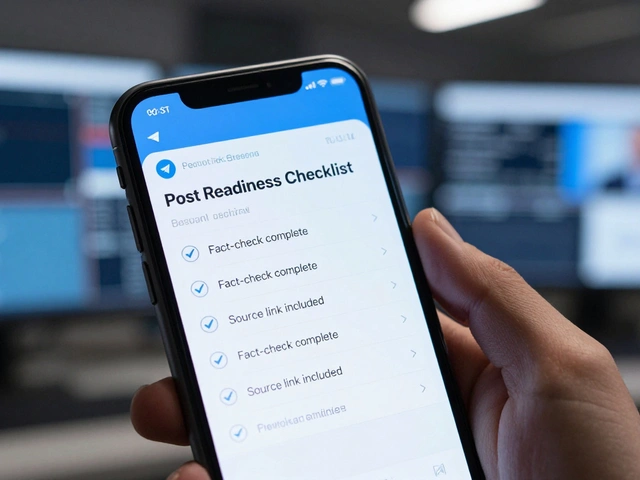
Instead of relying on memory, create a permanent "Post Readiness Checklist." This allows team members to tick off critical requirements in real-time. For a news post, your checklist should include:
- Fact-check verification complete
- Primary source link included and tested
- Image captions added and credited
- Publication date clearly stated
- Grammar and spell-check performed
Because these lists are dynamic, a lead editor can see exactly which steps are finished. If the "Source Link" box isn't checked, the post doesn't go live. This transforms the workflow from a hopeful "I think it's ready" to a verified "It meets the standard."
Mastering the Visual Layout of News Posts
Consistency isn't just about the facts; it's about the look. If one post uses bold headers and the next uses italics, your channel feels disjointed. Telegram uses a specific markdown-style syntax that you need to master to keep things clean. Note that pasting from Word or Google Docs often strips this formatting, so you'll need to apply these directly in the app.
To keep your feed professional, stick to these specific styles:
- Headlines: Use double asterisks (
**Bold Text**) for the main hook. - Sub-details: Use underscores (
_Italic Text_) for dates or locations. - Technical Data: Use backticks (
`code`) for tickers, coordinates, or specific identifiers to make them pop.
If you're using Instant View, the rules are even stricter. This feature allows users to read your articles without leaving Telegram, but it requires a precise structure. You must include the full text, all media, and a mandatory publication date. If you add a signature or an ad that wasn't in the original source article, the page may fail to render correctly or look cluttered.
Building a Predictable Publishing Cadence
A news channel that posts 20 times one day and then goes silent for a week loses its audience. Subscribers develop habits; they want to know when to check your channel. The goal is to move from sporadic bursts to a reliable schedule.
For daily news, space your posts by at least 3 to 4 hours. This prevents "notification fatigue," where users mute your channel because their phone won't stop buzzing. If you run a weekly wrap-up, pick a specific day-like Friday afternoons-and never miss it. This creates a "content pillar" that your audience relies on.
| Tier | Method | Best For | Effort Level |
|---|---|---|---|
| Basic | Native Scheduling | Single-person teams | Low |
| Intermediate | Scheduling Bots | Recurring thematic posts | Medium |
| Advanced | Multi-platform Tools | Cross-channel strategy | High |
| Automated | RSS Automation | Blog/Podcast feeds | Hands-off |
The Batch Processing Method for Content Creation
Creating posts one by one as the day goes on is a recipe for burnout. Instead, professional news teams use batch processing. This means spending one dedicated block of time-perhaps every Monday morning-to create and schedule the "evergreen" content for the entire week.
Evergreen content includes things like "How-to" guides, historical context for current events, or recurring weekly summaries. Once these are scheduled, your team is free to focus exclusively on breaking news. This hybrid approach balances the efficiency of automation with the human touch of real-time reporting. When a major story breaks, you simply slot it into the schedule or post it immediately, knowing that your baseline content is already handled.
Common Pitfalls in News Formatting
Even with a checklist, a few common mistakes keep popping up in Telegram feeds. First is the "Wall of Text." Long paragraphs are intimidating on a mobile screen. Break your news into short, punchy paragraphs of 2-3 sentences each. Use bullet points for lists of facts or key takeaways.
Another issue is inconsistent linking. Some posters use hyperlinked text, while others paste long, ugly URLs. Decide on one style and stick to it. If you're using the Telegram Premium feature set, you can even use checklists to verify that all links in a batch of posts are pointing to the correct landing pages before the scheduled time arrives.
Do I need Telegram Premium to use checklists?
Yes, the checklist feature was introduced as part of the Premium subscription model. While standard users can still use polls and quizzes, dynamic, real-time task tracking via checklists is reserved for Premium members.
How do I actually start a checklist in the app?
Open any chat (like Saved Messages or a group), tap the paperclip attachment icon at the bottom left, and select the "Checklist" tab. From there, you can add your individual items and customize the list.
Will my formatting carry over from Google Docs to Telegram?
Usually, no. Telegram uses its own specific syntax. If you paste text from an external editor, you will likely need to manually re-apply bold, italic, or monospace formatting within the Telegram app to ensure it displays correctly.
What is the best frequency for news posts to avoid muting?
For channels that post multiple times a day, it is recommended to space posts by at least 3 to 4 hours. This keeps the audience engaged without overwhelming their notifications.
What are the requirements for an Instant View page?
Instant View pages must include the entire text of the article, all original formatting, media, and a mandatory publication date. You cannot add extra content, such as ads or author signatures, that wasn't in the original source.
Next Steps for Your News Team
If you're just starting, don't try to automate everything at once. Start by creating a simple "Post Readiness" checklist in your Saved Messages. Use it for one week to see where the most common errors occur. Once you've ironed out the kinks in your manual process, move toward batch scheduling your evergreen content using native tools or a scheduling bot. Finally, audit your channel's visual style-pick your bold/italic standards and stick to them across every single post to build that professional, trustworthy brand identity.