Most publishers treat their website as the final destination. You write a 2,000-word guide, hit publish, and hope SEO does its job. But what if your audience is already scrolling through a messaging app instead of waiting for an email newsletter? Telegram isn’t just for private chats anymore. With over 700 million monthly active users, it has evolved into a powerful broadcast platform where long-form content thrives.
The problem? Copy-pasting a URL from your blog to a Telegram channel rarely works. It feels lazy, gets lost in the noise, and offers no value to the reader. The solution is repurposing. This means adapting your existing web articles into formats that fit Telegram’s unique culture, technical limits, and user expectations. Let’s look at how to turn your static web content into engaging Telegram distribution without doubling your workload.
Instant View vs. Raw Links: The Reading Experience
When you share a link on Telegram, users see a preview card. If they tap it, they usually leave the app to open your website in a browser. This creates friction. Users hate cookie banners, slow loading times, and paywalls. That’s why Telegram Instant View is a feature that renders web articles inside the Telegram client using a clean, fast, and consistent template.
Instant View strips away ads, scripts, and complex layouts, leaving only the text and images. It loads instantly, even on poor connections. For publishers, this is a game-changer because it keeps the user engaged within the app while still driving traffic back to your site via embedded links.
To get Instant View working, you don’t need to rebuild your website. You just need to create a template in Telegram’s Instant View Editor. This tool uses XPath expressions to map your HTML elements (like titles, authors, and body paragraphs) to Telegram’s layout. As developer Serhii Romanchuk noted in early 2025, you can even use undocumented meta tags to force compatibility if your site structure is tricky. Once approved by Telegram’s team, every link you share from that domain will show an “Instant View” button. This small technical step significantly boosts readability and retention.
Chunking Long-Form Content for Mobile Readers
Telegram users scroll quickly. A wall of text, even in Instant View, might not get finished reads. The most effective strategy is chunking. Take one comprehensive article from your website and break it down into smaller, digestible pieces.
- The Teaser Post: Write a compelling 3-4 sentence summary with a strong hook. Include the main takeaway and a link to the full article. Use bold text for key points.
- The Thread Series: If your article has distinct sections (e.g., “5 Steps to SEO”), post each step as a separate message in a thread. Pin the first message so new subscribers know where to start.
- The Daily Drip: Schedule posts to go out over several days. This keeps your channel active and gives readers time to absorb information without feeling overwhelmed.
This approach respects the platform’s constraints. While Telegram allows up to 4,096 characters per bot message, human attention spans are shorter. Aim for 300-600 words per post when summarizing. Use inline formatting like <b> for emphasis and <spoiler> tags to hide answers or extra details, encouraging interaction.

Visual and Media Transformations
Text alone doesn’t always stand out in a busy feed. Repurposing also means changing the format. Your website article likely contains data, quotes, or processes that can be visualized.
Create infographics or quote cards from your article’s key statistics. Telegram supports sending albums of up to 10 images in a single post. You can upload a carousel of infographic panels that summarize your article, followed by a caption linking to the source. This appeals to visual learners and increases the likelihood of forwards.
You can also convert text into audio. Record a voice message summarizing the article’s core argument. Voice messages feel personal and authentic on Telegram. Alternatively, attach a PDF version of the article as a document. Telegram allows files up to 2 GB, so high-quality PDFs or slide decks work perfectly. Label them clearly, such as “Full-Guide-2026.pdf,” so users know exactly what they’re downloading.
Automation Workflows Without Losing Quality
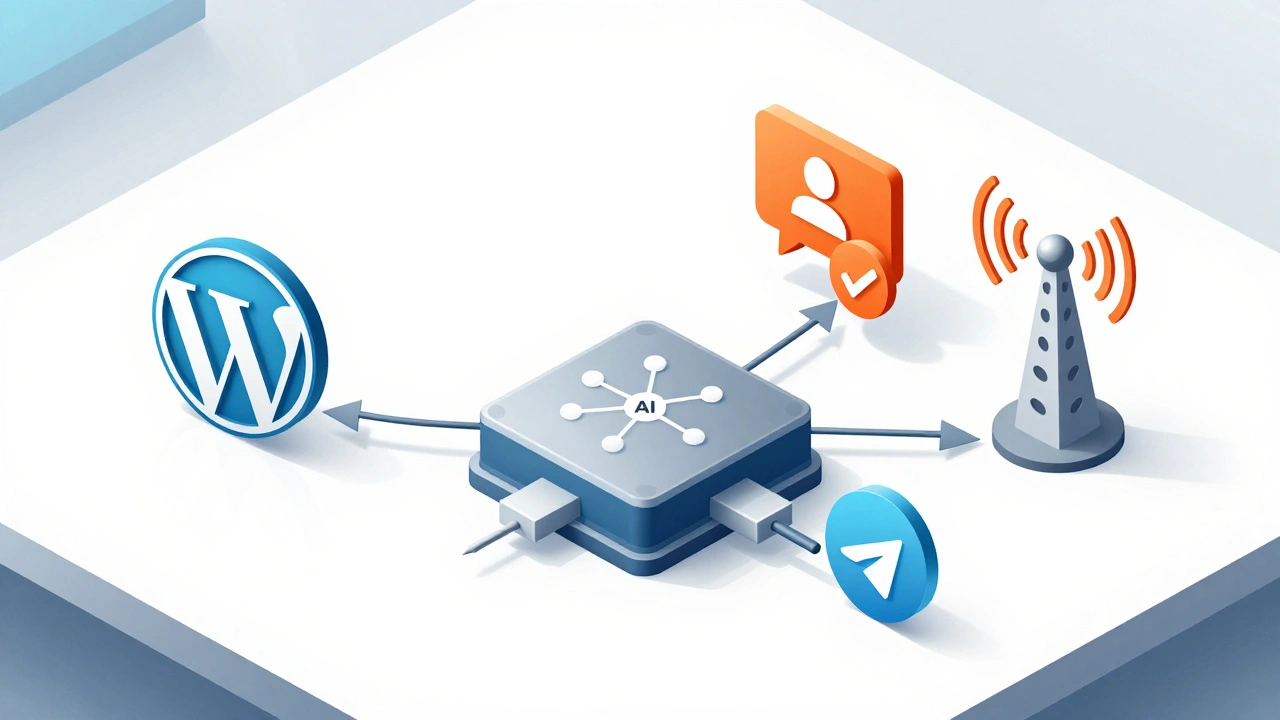
Manual posting is unsustainable for regular publishers. Automation tools like n8n, Zapier, or Make can bridge your CMS (like WordPress) and Telegram. However, there’s a critical distinction between distribution and repurposing.
Distribution is simply pushing an RSS feed title and link to Telegram. This often results in low engagement because it lacks context. Repurposing involves transformation. A better workflow looks like this:
- Trigger: New article published on your website.
- Processing: An AI model (like GPT-4) summarizes the article into a 200-word teaser and extracts three key bullet points.
- Formatting: The tool adds Markdown formatting, hashtags, and a call-to-action link.
- Approval: The draft is sent to a private Telegram group for editorial review.
- Publishing: Once approved via a reaction emoji, the bot posts it to your public channel.
This “human-in-the-loop” approach ensures quality. It prevents generic, robotic posts and maintains your brand voice. Tools like n8n offer flexible nodes for this exact pipeline, allowing you to fetch HTML, parse content, and send formatted messages via the Telegram Bot API.
Engagement and Community Building
Telegram channels are broadcast-only by default, but they become communities when linked to discussion groups. Enable comments on your channel posts by linking a dedicated group. This invites readers to discuss the repurposed content, ask questions, and share insights.
Use reactions strategically. Ask specific questions in your post captions to encourage users to react with thumbs-up or heart emojis. These signals help you gauge interest in future topics. Remember, Telegram shows posts chronologically, not algorithmically. Consistency matters more than virality. Posting 2-4 times a week with valuable, repurposed summaries builds trust and loyalty faster than sporadic bursts of raw links.
| Strategy | Effort Level | Best For | Key Benefit |
|---|---|---|---|
| Raw Link Sharing | Low | Breaking News | Speed |
| Instant View Integration | Medium (Setup) | Long-Form Articles | Seamless Reading |
| Chunked Threads | High | Tutorials/Guides | Higher Engagement |
| Visual Carousels | High | Data-Heavy Posts | Viral Potential |
Avoiding Common Pitfalls
One major risk on Telegram is being associated with misinformation networks. Academic studies have shown that junk news spreads rapidly through forwarded messages. To protect your reputation, always maintain clear branding. Never strip attribution when forwarding your own content. Ensure your summaries preserve nuance and don’t oversimplify complex topics into clickbait headlines.
Also, monitor your automation. Bots can hit rate limits if you schedule too many posts at once. Test your workflows thoroughly before going live. And remember, Telegram doesn’t offer built-in SEO benefits like Google does. Your growth relies on organic shares and cross-promotion. Focus on providing genuine value, and your audience will grow naturally.
Do I need to rewrite my entire article for Telegram?
No. You don’t need to rewrite everything. Instead, extract the core idea, create a concise summary (300-600 words), and add a link to the full article. Focus on adapting the tone to be more conversational and mobile-friendly.
What is the best way to set up Instant View?
Use Telegram’s official Instant View Editor. Create a template that maps your website’s HTML elements to Telegram’s layout. Submit it for approval. Once approved, all links from your domain will automatically display an Instant View button.
Can I automate repurposing without losing quality?
Yes, by using a human-in-the-loop workflow. Use tools like n8n or Zapier to generate drafts via AI, then send them to a private Telegram group for editorial review before publishing to your public channel.
Is Telegram good for SEO?
Not directly. Telegram posts aren’t indexed by search engines like Google. However, Instant View links drive traffic back to your website, which can indirectly boost your SEO through increased dwell time and reduced bounce rates.
How often should I post repurposed content?
Consistency is key. Aim for 2-4 posts per week for thought leadership or niche topics. For news-heavy channels, daily updates may be appropriate. Avoid spamming; prioritize value over volume.